—
★ StatTrak™ M9 Bayonet | Doppler (Minimal Wear) Sapphire
- Type
- Knife
- Weapon
- M9 Bayonet
- Rarity
- Covert
- Other category
- Regular
Offers 0
No offers available
Similar skins
Show allAll- FT / 0.34271★ M9 BayonetBright Water296.02 $
- WW / 0.44193★ StatTrak™ M9 BayonetUrban Masked308.91 $
- MW / 0.12802★ StatTrak™ M9 BayonetSafari Mesh317.55 $
- WW / 0.38520★ StatTrak™ M9 BayonetUltraviolet331.64 $
- WW / 0.40887★ StatTrak™ M9 BayonetStained333.05 $
- BS / 0.49214★ StatTrak™ M9 BayonetBright Water375.44 $
- BS / 0.50499★ StatTrak™ M9 BayonetNight377.45 $5


Skin overview
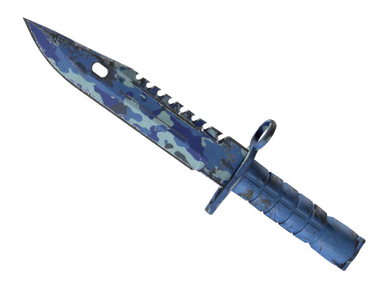
This Sapphire phase of the M9 Bayonet Doppler is read mostly as a single block of rich blue, broken only by darker marbling and the silver teeth of the saw-back. At Minimal Wear the finish keeps that saturated look in game, with any marks limited to small specks near the tip or edges. It offers the same recognisable colour with slightly less strict demands on condition.
Item type: knife. Covert is the top weapon rarity: usually the most prominent items of a collection or case.
Anodized Multicolored: several colours in the metal coating; it wears little, the colours only dull with use.
Other qualities of this skin: Factory New.
How the skin looks in Minimal Wear
The blade is coloured in deep sapphire blue with violet tones toward the spine and a darker marbled pattern running across the flat. The saw-back teeth and the cutting edge show bare silver steel, which frames the blue and makes the outline sharp.
At Minimal Wear small light specks can appear near the blade tip and along the edge of the spine. The flat of the blade, the guard and the ring still look clean and saturated. In normal play the difference from Factory New is hard to notice because the marks are small and sit at the extremities. Inspecting the knife closely is the only way to see where the coating has started to thin.
Minimal Wear wear: float 0.07–0.08
The whole float range of ★ StatTrak™ M9 Bayonet | Doppler Sapphire is 0–0.08; Minimal Wear takes the 0.07–0.08 segment (12% of the scale). The lower the float within the range, the cleaner the surface looks and the higher a copy is usually priced.
Origin of the skin
It drops as a rare special item from:
- Chroma Case (on sale since Jan 8, 2015)
- Chroma 2 Case (on sale since Apr 15, 2015)
- Chroma 3 Case
StatTrak™ version
This is the StatTrak™ version: the counter on the weapon shows confirmed kills. There is also the regular version without the counter.
What to check before buying
- Check the float position within the range, since copies at the lower end look noticeably cleaner on close inspection.
- Inspect the blade tip and the spine edges, as these are the first places where specks appear.
- Confirm on the inspect screen that the item is the Sapphire phase and that the blue is even across the blade.
- Check whether the copy is StatTrak™ and whether it carries a name tag.
Who should buy Minimal Wear
- Players who want the sapphire colour in game and accept tiny marks at the tip.
- Buyers who want an easier entry into this phase than Factory New.
- Conclusion: nearly the same look in play with a looser condition requirement.